 Source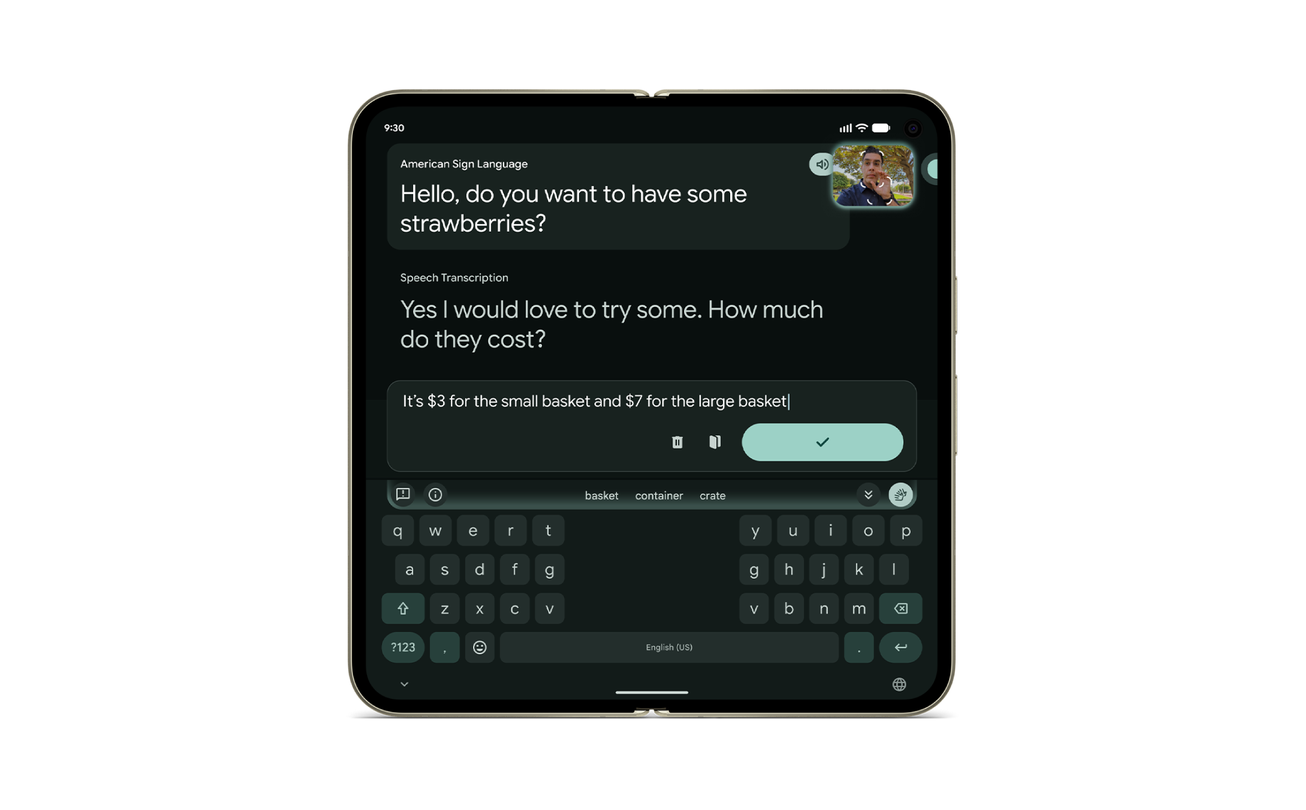
How to use sign-to-text translation on Pixel 11
Google has introduced a sign-to-text translation feature for American Sign Language (ASL) on the Pixel 11 series. It uses an SL2T model to translate ASL into written English in real time.
Why it matters
This allows members of the Deaf community to use their native language to communicate more easily via Gboard and Live Transcribe.
The details
- The system analyzes hand shapes, facial expressions, and body movements.
- It supports both one-handed and two-handed signing.
- Users access the feature through the Gboard toolbar using the front camera.
Show entities and relationshipsHide entities and relationships
In this article
Key connections
Google owns Sign Language-to-Text (SL2T)
Google developed the Sign Language-to-Text (SL2T) translation model.
Pixel 11 uses Sign Language-to-Text (SL2T)
Pixel 11 sign-to-text translation feature is powered by the SL2T translation model.
Sign Language-to-Text (SL2T) is built with Sign Language Translation
SL2T model is built with multilingual sign language translation technology.
Related events
Google Introduces Sign-to-Text Translation on Pixel 11
Get the weekly recap
The stories like this one, picked and explained — once a week, straight to your inbox.